Examples to ALTER and TRUNCATE tables using MySQL
- Use the ALTER TABLE statement in the correct syntax.
- Use TRUNCATE statements in syntax.
- Execute examples of ALTER and TRUNCATE statements.
ALTER TABLE
ALTER TABLE statements can be used to add or remove columns from a table, to modify the data type of columns, to add or remove keys, and to add or remove constraints. The syntax of the ALTER TABLE statement is:
ADD COLUMN syntax
- 1
- 2
ALTER TABLE table_nameADD column_name data_type;
A variation of the syntax for adding column is:
- 1
- 2
ALTER TABLE table_nameADD COLUMN column_name data_type;
By default, all the entries are initially assigned the value NULL. You can then use UPDATE statements to add the necessary column values.
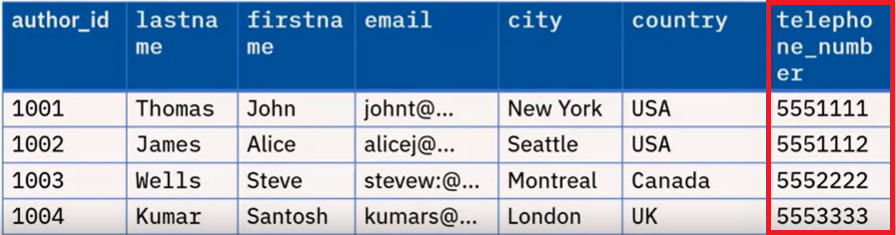
For example, to add a telephone_number column to the author table in the library database, the statement will be written as:
- 1
- 2
ALTER TABLE authorADD telephone_number BIGINT;
Here, BIGINT is a data type for Big Integer.
After adding the entries to the new column, a sample output is shown below.
Modify column data type
- 1
- 2
ALTER TABLE table_nameMODIFY column_name data_type;
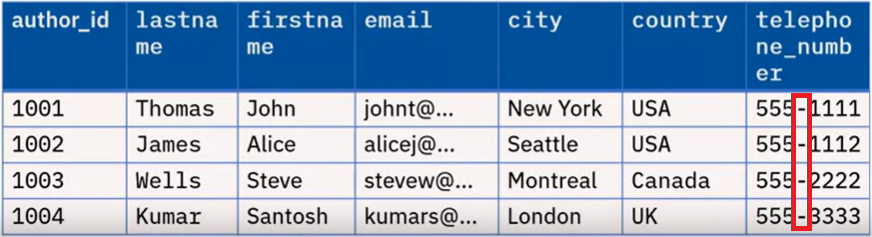
Sometimes, the data presented may be in a different format than required. In such a case, we need to modify the data_type of the column. For example, using a numeric data type for telephone_number means you cannot include parentheses, plus signs, or dashes as part of the number. For such entries, the appropriate choice of data_type is CHAR.
To modify the data type, the statement will be written as:
- 1
- 2
ALTER TABLE authorMODIFY telephone_number CHAR(20);
The entries can then be updated using UPDATE statements. An updated version of the "author" table is shown below.
TRUNCATE Table
TRUNCATE TABLE statements are used to delete all of the rows in a table. The syntax of the statement is:
- 1
TRUNCATE TABLE table_name;
So, to truncate the "author" table, the statement will be written as:
- 1
TRUNCATE TABLE author;
The output would be as shown in the image below.
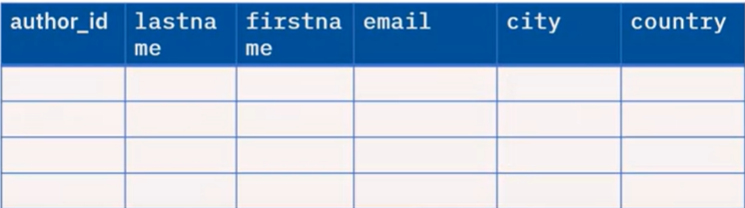
Note: The TRUNCATE statement will delete the rows and not the table.
Comments
Post a Comment